
Download PromptDoDo AI – AI‑powered art‑to‑design converter, free & secure tool
Overview
PromptDoDo AI is a cloud‑based graphics application that transforms sketches, paintings, or any visual concept into polished design assets with the help of artificial intelligence. The platform is built for a wide audience, ranging from professional designers who need rapid style iterations to hobbyists looking for a fun way to experiment with visual ideas. By uploading an image and selecting a style card from the extensive “Style Market,” users can instantly generate a new version of their artwork that matches a chosen aesthetic—whether that’s minimalist flat design, hyper‑realistic textures, or vibrant hand‑drawn illustration.
The service operates on a credit system: free users receive a modest number of daily credits that allow them to test the tool without any financial commitment, while paid plans unlock unlimited generations, higher‑resolution exports, and priority processing. PromptDoDo AI also provides a rich learning ecosystem, including step‑by‑step tutorials, a community hub where creators can share and remix designs, and transparent privacy policies that guarantee data security. Because the entire engine runs on secure cloud servers, there is no need for local hardware upgrades; even a modest laptop or smartphone can produce professional‑grade results.
This review will walk through the core capabilities, installation flow, system compatibility, the strengths and weaknesses observed during testing, and answer the most common questions prospective users tend to ask.
Key Features & Benefits
- AI‑Driven Style Transfer: Convert any sketch, photograph, or digital painting into a professionally styled design within seconds, drastically reducing manual re‑creation time.
- Extensive Style Market: Browse hundreds of curated style cards that cover trends such as flat design, neon cyber‑punk, hand‑drawn watercolor, and photorealistic textures. New cards are added weekly based on community feedback.
- Credit System (Free & Paid): Free accounts receive five daily credits, ideal for occasional experimentation. Paid subscriptions provide unlimited credits, bulk generation discounts, and priority server queues.
- Precise Canvas Controls: Choose from preset dimensions (e.g., 1080 × 1080 px, A4, Instagram Story) or define custom sizes to fit any output requirement, from web graphics to print‑ready PDFs.
- Comprehensive Tutorial Library: Video walkthroughs and written guides cover everything from basic uploads to advanced techniques like layering multiple style cards and fine‑tuning AI intensity sliders.
- Community Creations Hub: Share your generated designs, explore work from other creators, and remix popular projects, fostering a collaborative environment that sparks new ideas.
- Visibility & Sharing Options: Set projects to private, public, or unlisted. One‑click embedding options let you insert designs directly into blogs, portfolios, or social media posts.
- Secure Cloud Processing: All data is encrypted in transit (TLS 1.3) and stored on GDPR‑compliant servers. Uploaded files are automatically deleted after 24 hours, ensuring your intellectual property remains confidential.
- Cross‑Platform Browser Access: Since PromptDoDo AI runs entirely in the browser, it works on Windows, macOS, Linux, Android, and iOS without any additional plugins or installations.
These features combine to create a workflow that is both powerful and approachable. Designers can iterate through dozens of visual directions in the time it would traditionally take to manually redraw an asset, while the community aspects keep the platform fresh and inspiring. For agencies, the credit‑based pricing model scales with usage, allowing teams to allocate resources efficiently. Meanwhile, casual users benefit from the generous free tier, which provides enough credits to explore the core capabilities without feeling pressured to upgrade. Overall, PromptDoDo AI’s feature set positions it as a versatile tool that bridges the gap between creative ideation and production‑ready output.
Installation, Compatibility & How to Use PromptDoDo AI
PromptDoDo AI eliminates the need for a traditional installation process because it is a fully web‑based service. All that is required is a stable internet connection and a modern browser that supports HTML5, CSS3, and WebGL. Compatible browsers include Chrome, Firefox, Edge, and Safari on desktop, as well as Chrome for Android and Safari for iOS. Because the application runs on remote servers, it is completely independent of the underlying operating system; whether you are on Windows 10/11, macOS Ventura, a Linux distribution, Android 13, or iOS 17, the experience remains consistent.
Getting started is straightforward:
- Create an Account: Visit promptdodo.ai, register with an email address or social login, and verify your account via the confirmation email. Verification unlocks your daily credit allocation.
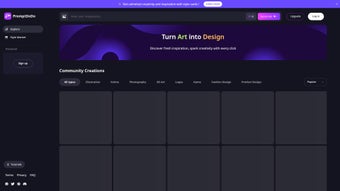
- Explore the Dashboard: After logging in, you’ll see a clean interface with a left‑hand navigation pane (Style Market, My Projects, Community, Tutorials) and a central canvas preview. The design is responsive, adapting to screen size from desktop monitors to mobile phones.
- Upload Artwork: Click “Upload,” drag‑and‑drop, or import from Google Drive, Dropbox, or OneDrive. Supported formats include PNG, JPEG, SVG, and layered PSD files, giving flexibility for both raster and vector inputs.
- Select a Style Card: Browse the Style Market, hover over a card to see a live preview on a sample image, then click “Apply.” Each application consumes one credit and instantly queues the generation request on the cloud.
- Adjust Settings: Fine‑tune AI intensity (color saturation, line thickness, texture depth) using sliders, set exact canvas dimensions, and choose visibility (public, private, unlisted).
- Generate & Refine: Hit “Generate.” Within seconds the AI returns a new design. Use “Regenerate” for variations or the built‑in editor to manually adjust elements, masks, or text layers.
- Download or Share: Once satisfied, export the asset as PNG, JPEG, PDF, or SVG. You can also share directly to social platforms, embed on a website, or publish to the Community Creations board for feedback.
Power users may also request an API key from the account settings page, allowing integration with external design pipelines, CI/CD workflows, or custom automation scripts. Because all processing occurs in the cloud, there is no impact on local CPU or GPU resources, making PromptDoDo AI a viable solution even on low‑spec devices or while traveling.
Pros, Cons & Frequently Asked Questions
Pros
- Instant AI style transfer saves hours of manual redesign work.
- Extensive, regularly updated Style Market keeps the tool fresh.
- Free daily credits make casual experimentation risk‑free.
- Secure, GDPR‑compliant cloud processing protects user data.
- Fully browser‑based, so it works on any OS without additional software.
- API access enables automation for professional studios.
Cons
- Free credit limits can be restrictive for heavy users.
- Advanced customization (custom AI models, batch processing) is only available on paid tiers.
- Reliance on internet connectivity; offline work is not possible.
- Generated designs may occasionally require minor manual cleanup for pixel‑perfect branding.
Frequently Asked Questions (FAQ)
How many free credits do I receive each day?
Free users are granted five daily credits. Each AI generation consumes one credit, and unused credits do not roll over to the next day.
Can I use PromptDoDo AI for commercial projects?
Yes. Once you download the generated design, you own full commercial rights. Paid plans provide higher‑resolution exports and priority support for business use.
Is my uploaded artwork stored on PromptDoDo’s servers?
Uploaded files are temporarily cached only for the duration of the generation process and are automatically deleted within 24 hours, complying with GDPR and privacy regulations.
Do I need a powerful computer to run the AI locally?
No. All AI computation happens on PromptDoDo’s cloud servers, so even low‑spec devices can generate high‑quality designs without lag.
Can I integrate PromptDoDo AI into my existing design workflow?
Absolutely. Paid users receive an API key that can be called from design tools, CI pipelines, or custom scripts, enabling automated batch processing.
Conclusion & Call to Action
PromptDoDo AI delivers a compelling blend of artificial‑intelligence creativity and practical design workflow. Its cloud‑native architecture means you can work from any device, any operating system, without worrying about hardware constraints. The free tier provides enough daily credits to explore the core functionality, while the credit‑based subscription scales gracefully for professional teams that need unlimited generations, higher‑resolution assets, and API access.
Security is a strong point, with end‑to‑end encryption and strict data‑retention policies that respect user privacy. Although the free version’s credit limits may feel restrictive for power users, the overall value proposition—speed, versatility, and community‑driven inspiration—makes PromptDoDo AI a worthy addition to any designer’s toolkit. If you’re ready to accelerate your visual production and experiment with AI‑generated styles, sign up for PromptDoDo AI today and claim your daily credits.
Your next standout design could be just one AI prompt away.



.png)



